End of Life reached for Extract Any Mail Pro and Email Sorter Pro View Details!

Email Sorter Ultimate: Bulk Email Address Sorter by MX Provider

Email Sorter Ultimate is Windows software for sorting large email-address lists by Mail Exchanger (MX) provider. It categorizes Gmail, Microsoft 365, Outlook, Yahoo, Zimbra, GoDaddy, and other addresses from bulk lists. It is an email-list sorter.
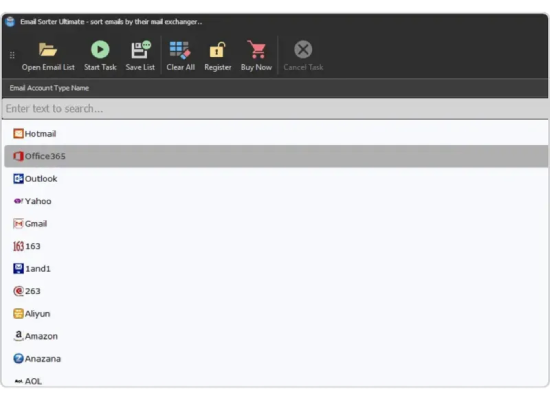
Major Supported MX Providers 

What is An Email Sorter?

An email sorter is a Windows tool that helps sort large lists of contacts. It looks up the records of the Domain Name System to figure out who hosts each email address. Then it puts each email address into a group based on the Mail Exchange provider, like Gmail or Office 365. This helps people who send a lot of emails make sure their messages get delivered and do not hurt their reputation. The email sorter can also make groups for custom email services that companies use.

How it works

Simplify Workflows With Intuitive Tools

01

Load List

Click "Open Email List" and import your list as a .txt, .xls and .csv file — the email sorter reads every address instantly.

02

Start Task

Click "Start Task" and the MX sorter checks each address's MX record in the background, automatically grouping Gmail, Microsoft 365, Zimbra, and 50+ other providers.

03

Save Result

Click "Save List" and choose a destination folder — each provider group is exported as its own ready-to-use file, with no manual copying or sorting.

Email Sorter

Best Email Sorter, sort email address with ease

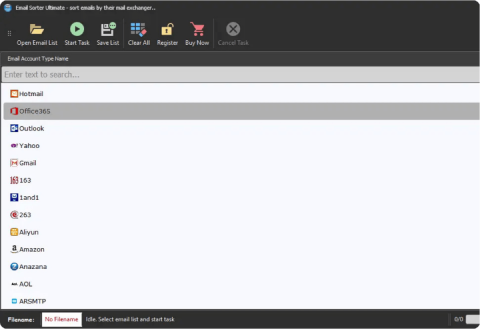
The Email Sorter Ultimate sorts email addresses according to the email address’s MX provider. It cuts above the other email sorting software due to its accuracy and efficiency.

Check icon
It supports a wide range of email providers
Check icon
Software is easy to use due to its user-friendly interface
Check icon
Additional MX can be added on request
Zimbra Judger

Best Zimbra Email Sorter

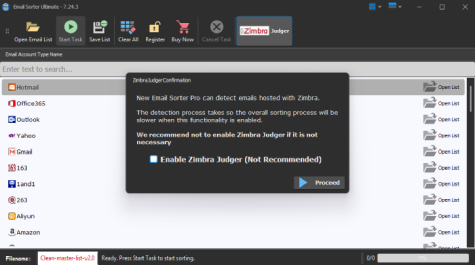
Zimbra-hosted addresses don't follow typical MX patterns, so standard sorters often misclassify them. Email Sorter Ultimate's built-in Zimbra Judger detects Zimbra Collaboration Suite (ZCS) hosting signatures directly for accurate sorting.

Feature icon
Identifies canonical ZCS naming conventions (zm-, zmail, zbox, webmail-zimbra) across authoritative secondary MX trees.
Feature icon
Evaluates webmail and REST/SOAP API endpoint signatures (/service/soap/, /zimbra/public/) published on associated mail server IP ranges.
Feature icon
Extracts Subject Alternative Names (SAN) and Common Names (CN) from mail port 25/587 STARTTLS certificates matching Synacor ZCS distributions.
Feature icon
Cross-references recipient mail server IP subnets against ASTGD’s verified database of higher-education and telecom Zimbra host deployments.
Comparison

Email Sorting vs Email Verification

Even though both tools help make outbound marketing lists better, they have different goals. Knowing the difference avoids problems with sending messages and saves thousands of dollars in verifier credit costs

Feature / Attribute Email Sorting
(Email Sorter Ultimate)
Email Verification
(Bouncer, ZeroBounce, etc.)
Primary Objective Classify hosting infrastructure (M365, Google Workspace, Zimbra) to allocate sending mailboxes & rate limits. Verify if a specific user mailbox exists and can receive incoming mail.
Query Protocol DNS Type 15 (MX) / RFC 1035 UDP Queries Active SMTP Handshake (HELO/EHLO → RCPT TO)
Spam Trap / Bounce
Risk
No SMTP verification risk Moderate Risk (Aggressive SMTP pings trigger honeypot flags & IP blocks)
Processing Speed 50,000+ emails per minute (Local async resolver) 500 to 2,000 emails per minute (Throttled by remote mail server connection timeouts)
Pricing Model One-time Lifetime License (Unlimited sorting) Expensive per-lead recurring credits ($0.005–$0.01 per lead)
Recommended
Workflow
Step 1 Sort and segregate providers first. Step 2 Verify segregated batches through provider-specific verifiers.
Primary Objective
Email Sorting
Classify hosting infrastructure (M365, Google Workspace, Zimbra) to allocate sending mailboxes & rate limits.
Email Verification
Verify if a specific user mailbox exists and can receive incoming mail.
Query Protocol
Email Sorting
DNS Type 15 (MX) / RFC 1035 UDP Queries
Email Verification
Active SMTP Handshake (HELO/EHLO → RCPT TO)
Spam Trap / Bounce Risk
Email Sorting
ZERO Risk (Never connects to recipient MTA)
Email Verification
Moderate Risk (Aggressive SMTP pings trigger honeypot flags & IP blocks)
Processing Speed
Email Sorting
50,000+ emails per minute (Local async resolver)
Email Verification
500 to 2,000 emails per minute (Throttled by remote mail server connection timeouts)
Pricing Model
Email Sorting
One-time Lifetime License (Unlimited sorting)
Email Verification
Expensive per-lead recurring credits ($0.005–$0.01 per lead)
Recommended Workflow
Step 1 Email Sorting
Sort and segregate providers first.
Step 2 Email Verification
Verify segregated batches through provider-specific verifiers.
Privacy

Privacy and Data Handling

In business-to-business sales and when dealing with lead generation, customer contact lists are very important information. ASTGD is built with a Zero-Telemetry Local-First security approach

100% Local Execution

All parsing, DNS querying, and heuristic evaluations take place directly on your workstation or internal server. No lists are uploaded to ASTGD cloud servers.

GDPR & CCPA Compliant

Because no personal identifiable information (PII) is transferred, stored, or processed by a third party, your outreach operations remain fully compliant with European and Californian data privacy regulations.

Zero Log Retention

The software retains no diagnostic telemetry, analytics beacons, or remote keystroke logs. Your proprietary ICP lead data stays strictly within your company's ownership.

Direct Authoritative DNS

Queries are dispatched directly between your machine and public or corporate DNS resolvers (e.g., Cloudflare 1.1.1.1, Google 8.8.8.8, Quad9, or internal BIND/PowerDNS).

Pricing Plan

Fully Functional Trial Version

See how Email Sorter Ultimate performs with your own list. Download the free trial and test it before purchasing.

Download Free Trial
Email Sorter Ultimate
$40/lifetime

Buy the license key to get started!

Feature icon
One Time Purchase
Feature icon
Lifetime license
Feature icon
Free update
Buy Lifetime License
Upgrade Email Sorter
$10/lifetime upgrade

Buy the license key to get started!

Feature icon
Easy upgrade
Feature icon
High-Speed MX Sorting
Feature icon
Many New Features
Upgrade Email Sorter
Purchase Licenses

Save More with Multi-License
Purchase Options

1 License

Save 20%
Price per license $40
Total price
$40 $50
Buy for $40

2 Licenses

Save 25%
Price per license $37.5
Total price
$75 $100
Buy for $75

5 Licenses

Save 32%
Price per license $34
Total price
$170 $250
Buy for $170

10 Licenses

Save 40%
Price per license $30
Total price
$300 $500
Buy for $300
How it works

Other Features of the Email Sorter Ultimate at a Glance

Sort free & paid Microsoft emails separately

Separates GoDaddy & GoDaddy Office

Fast sorting, accurate results

Enable or disable Zimbra Judger whenever needed

Display

The new email sorter sorts Office365 and other free Microsoft emails (Outlook, Hotmail, MSN, Live) separately.

CTA imageElement

The Team Behind This Email Sorter Ultimate

Email Sorter Ultimate is built by ASTGD LLC — a BASIS-registered Windows email domain sorter software company founded in 2013, with offices in Sheridan, Wyoming, USA and Rajshahi, Bangladesh. Trusted by 5,000+ businesses across 40+ countries, every product is developed and supported entirely in-house.

💻 Windows 7/10/11 & Windows Server Compatible
⚡ Instant Key Delivery via Email
Smart Bundles

Optimized RDP Platform with Full Software Compatibility

Email Sorter Ultimate
+ 2GB Remote Desktop
$70.20
$45 /mo
7-Day Money Back Guarantee
Buy Now
Email Sorter Ultimate
+ 8GB Remote Desktop
$100.98
$65 /mo
7-Day Money Back Guarantee
Buy Now
Customer Portal

Advanced Client Portal for Easy License Management

Other Products

Check Out Other Products as Addition to Email Sorter Ultimate

Extract any mail ultimate box

Extract Any Mail Ultimate

Extract emails from email accounts
$50 $40
Buy Licenses
Feature icon
7-Day Money Back Guarantee
Valid email verifier box

Valid Email Verifier

Verify large email list
$60 $50
Buy Licenses
Feature icon
7-Day Money Back Guarantee
Rapid email sender box

Rapid Email Sender

Send emails without any hassle
$50 $40
Buy Licenses
Feature icon
7-Day Money Back Guarantee
Extract Any Mail Ultimate

Extract Any Mail Ultimate

Extract emails from your accounts quickly and efficiently.

7-Day Money Back Guarantee
$50$40
Buy License
Valid Email Verifier

Valid Email Verifier

Verify large email lists with accuracy and confidence.

7-Day Money Back Guarantee
$60$50
Buy License
Rapid Email Sender

Rapid Email Sender

Send emails faster without unnecessary complexity.

7-Day Money Back Guarantee
$50$40
Buy License
Testimonial

What Our Clients Say

I have been using almost all of their…

Show more
Finral
Customer
Bangladesh

Fast and relaible...

Show more
Michael Mick
Customer
Netherlands

Excellent i got all i need...

Show more
Cole Matthew
Customer
USA

Fast and reliable...

Show more
Benita Henderson
Customer
Nigeria

Trusted company super support

Show more
Al Imran Niloy
Customer
Bangladesh
FAQ

Frequently Asked Questions

What is an email sorter and how does it work?

An email sorter is software that automatically organizes a list of email addresses based on where each one is hosted, rather than making you sort them by hand. Email Sorter Ultimate works by checking each address's MX record — the DNS setting that determines which mail server actually handles that domain's email — then groups matching addresses together, so a mixed list becomes clean, provider-separated folders in seconds.

How do I sort emails by MX provider?

Open Email Sorter Ultimate, load your list as a .txt, .xls and .csv file using "Open Email List," click "Start Task," and the software checks the MX record for every address automatically. Once sorting finishes, use "Save List" to export each provider group into its own file — no manual lookup or spreadsheet formulas needed.

Why should I sort my email list before sending a campaign?

Different providers handle incoming mail differently — what lands in a Gmail inbox doesn't always behave the same way on Office 365 or Yahoo. Sorting your list first lets you adjust sending volume and timing per provider, which generally improves deliverability compared to blasting one identical batch to every domain at once.

What email providers can an email sorter detect?

Email Sorter Ultimate recognizes 50+ major mail providers, including Gmail, Office 365, Outlook, Yahoo, AOL, iCloud, Yandex, GoDaddy, IONOS, AT&T, and Zimbra-hosted domains. If you use a provider that isn't built in yet, additional MX providers can be added on request.

How is an email sorter different from an email verifier?

An email sorter organizes addresses by where they're hosted; it doesn't check whether the address itself is real or active. A verifier does the opposite — it confirms deliverability but doesn't group by provider. Email Sorter Ultimate is purely a sorting tool, so many people pair it with a separate verifier for a complete list-cleaning workflow.

Can an email sorter organize addresses by domain instead of just by provider?

Yes — Email Sorter Ultimate can sort email addresses by domain as well as by MX provider, so you can group contacts by company or organization, not only by which mail service they use.

Why does a good email sorter check MX records instead of just the email domain?

The domain name alone doesn't always tell you who actually hosts the mail — plenty of businesses use a custom domain (like you@yourcompany.com) while their email is really run through Office 365 or Google Workspace behind the scenes. Checking the MX record directly reveals the true host, which is why MX-based sorting is more accurate than guessing from the domain name.

How many emails can an email sorter handle at once?

Email Sorter Ultimate can load and sort 500,000 or more email addresses in a single batch, so even very large lists don't need to be split into smaller files before sorting.

What is a Zimbra Judger and why does it matter for email sorting?

A Zimbra Judger is a specialized detection feature built specifically to identify Zimbra-hosted email addresses, which are harder to distinguish through standard MX lookups than mainstream providers like Gmail or Outlook. Email Sorter Ultimate includes this built in, and it can be turned on or off depending on whether you need Zimbra-specific sorting for a given list.

How much does Email Sorter Ultimate cost, and is it a subscription?

Email Sorter Ultimate is a one-time $40 purchase for a lifetime license — there's no recurring subscription fee. Bulk pricing is available if you need multiple licenses, and a free trial download lets you test the full sorting process before you buy.

WhatsApp
ASTGD Support
Typically replies in a few hours
Hi there! 👋
How can we help you today?