End of Life reached for Extract Any Mail Pro and Email Sorter Pro View Details!

Email Extractor for Gmail, Outlook & Office 365 Extract Any Mail Ultimate v1.3.2

Extract Any Mail Ultimate is a professional email extractor software for Windows that extracts email addresses directly from Gmail, Outlook, Office 365, IMAP/POP3 accounts and local files — PDF, Word, Excel, CSV, and TXT. It uses OAuth 2.0 authentication and extracts without storing passwords or sending data to any server. 100% of your email account data is on your PC.

OAuth 2.0 login for Gmail & Microsoft 365 — zero password stored
Extract from PDF, Word, Excel, CSV, TXT — entire folders at once
IMAP/POP3 support: Yahoo, Zoho, Yandex, cPanel, Hostinger
100% local encrypted database — data never leaves your device
SSL/TLS encrypted connections on every extraction job
7-Day Money-Back Guarantee
Trusted by 4,000+ marketers and businesses
11 Years in Business
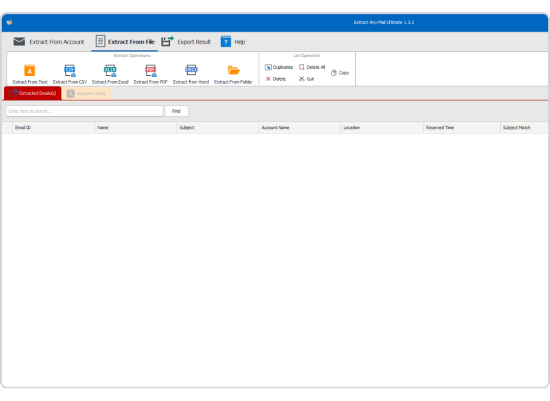
Extract Any Mail Ultimate dashboard showing email extraction from Gmail using OAuth 2.0Extract email from folderExtarction icon 2Extract mail

Major Compatible Email Providers

Office365 GoDaddy Gmail AOL iCloud Yahoo Zimbra Yandex IONOS ATT

What Is An Email Extraction Software?

Email extraction software is a tool that automatically scans email accounts, inboxes and local documents to find and collect email addresses. An email extractor reads through thousands of emails, folders and files and exports every email address, usable list instead of copying contact details one by one manually.

Gmail Extractor

Gmail Email Extractor

Login on Gmail . Google has turned off " Less Secure App " access in 2024 . You need to login using OAuth 2.0 authentication . Extract Any Mail Ultimate is a Gmail email extractor employing the official Google OAuth flow for extracting email from Gmail. This means your Gmail account password is never stored or transmitted.

How to Extract Emails from Gmail
Start the software and choose Gmail as your Email Account Type
Select OAuth 2.0 as the authentication method
Enter your Google cloud client id (setup once) and select your browser
Grant access through the Google login screen - no password stored in the app
Choose folders to scan: Inbox, Sent, Important or custom Gmail labels
Start extraction— the Gmail email extractor scans every selected folder
Export results to Excel (.xlsx), CSV or TXT in one click
Outlook Extractor

Outlook Email Extractor — Extract Emails from Outlook & Office 365

Extract Any Mail Ultimate is a full-featured Outlook email extractor and Office 365 email extractor. It connects through the Azure Portal using OAuth 2.0 which provides secure access to your Microsoft email account without giving your Outlook sign-in credentials to any third party.

How to Extract Emails from Outlook and Office 365
Register an app in Microsoft Azure Portal to get your OAuth Client ID (one time)
Launch Extract Any Mail Ultimate, then choose Microsoft 365 / Outlook as the account type
Select OAuth 2.0, enter your Client ID and follow the authorization steps on the screen
In the Microsoft login window, log in with your Microsoft mail account
Select Folders to Scan: Inbox, Sent Items, Deleted Items or any custom Outlook folder
Run extraction The Outlook email extractor scans the selected folders
Excel, CSV and TXT option to export
IMAP & POP3 Email Extraction

IMAP Email Extractor — Pull Leads from Any IMAP, POP3 & Webmail Account

Extract Any Mail Ultimate automatically detects server settings and ports after login for any Email Account that uses IMAP or POP3 including Yahoo Mail, Zoho Mail, Yandex, cPanel hosting email, Hostinger, IONOS, AT&T and more. No manual IMAP configuration needed.

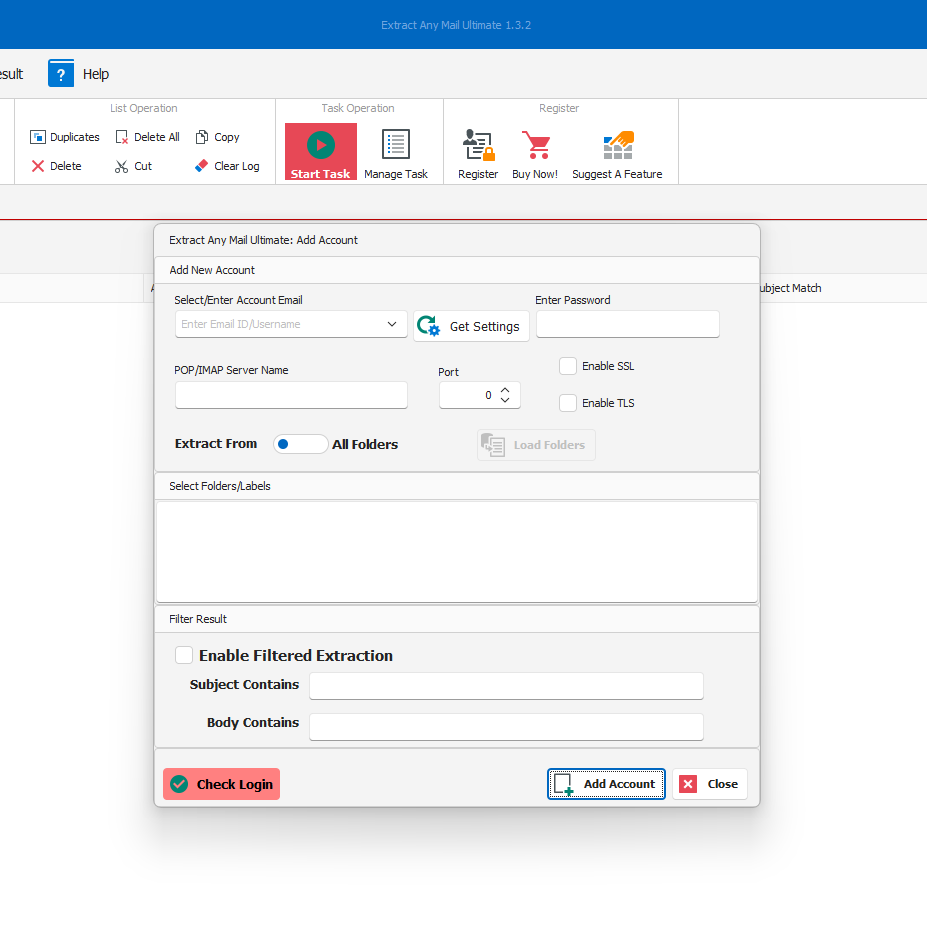
Auto-detect IMAP/POP3 server and port settings
Search Inbox, Spam, Sent or any custom folder
Batch extract of CSV/TXT import from more accounts
SSL/TLS encrypted on all IMAP connections
Smart Pause & Resume – no lost extraction progress
Bulk Extract emails from local files
File-Based Email Extraction

Extract Email Addresses from PDF, Word, Excel, CSV & TXT Files

Not all e-mail messages are in an inbox. Extract Any Mail Ultimate scans local files and full folder directories on your Windows PC – extracting all valid email addresses from PDFs, Word documents (.docx), Excel spreadsheets (.xlsx), CSV exports and plain text TXT files. Email account and Internet connection are not needed for file-based extraction.

Get leads from archived PDF contracts
Import contacts from CRM export (CSV/Excel)
Bulk TXT database email IDs extraction
Process all folder directories in batch
How It Works

How to Extract Emails in 3 Simple Steps

01

Login Methods

Select Basic Authentication for IMAP/POP3 accounts, or OAuth 2.0 for Gmail and Microsoft 365 — no password stored.

02

Configuration

Select your browser for OAuth login. The email extractor auto-fetches IMAP/POP3 server settings and ports — no manual setup needed.

03

Email Extraction

Add your account and extract email addresses by folder — Inbox, Sent, Spam, or custom labels. Export to Excel, CSV, or TXT instantly.

Use Case

The Email Extractor 4,000+ Businesses Worldwide Rely On

Individuals use Extract Any Mail Ultimate every single day for:

Feature icon
Email marketers building targeted contact lists by extracting email addresses from Gmail and Outlook email accounts
Feature icon
Sales teams recovering leads from PDF contracts, CRM exports, and Office 365 mailboxes
Feature icon
Digital agencies managing multiple client IMAP email accounts and extracting email addresses in bulk
Feature icon
Data analysts pulling email IDs from Excel, CSV, and TXT databases using the email extraction software
Feature icon
Anyone running email campaigns who needs a clean, verified email address list — extracted directly from their email account
Ideal for Email Marketers, Sales Staffs and Email Data Managers
SECURITY & PRIVACY

How Extract Any Mail Ultimate Protects Your Email Account & Data

OAuth 2.0 Authentication - No Password Stored

Pull emails from Gmail or Outlook without ever storing your sign-in password. All of your email account credentials are handled by Google or Microsoft’s own login system.

100% Local Processing – No Upload to Cloud

Each extracted email address is saved in an encrypted local database on your Windows PC. No remote servers. No vendor lock-in. Your data never leaves your device.

SSL/TLS Encryption for All Connections

All connections to Gmail, Outlook and other IMAP servers are encrypted using SSL/TLS. We can not intercept your email account credentials and extracted data in transit.

Security Feature Extract Any Mail Ultimate Web-Based Tools
OAuth 2.0 Authentication Built-in No
Password Stored Never Often Yes
Data Location 100% Local PC Cloud Server
Account Ban Risk None High
SSL/TLS Encrypted Always Varies
File Extraction Yes No
Pricing Model $40 One-Time Monthly Subscription
RDP Compatible Yes No
Pricing Plan

Try the Best Email Extractor Free

Don't just take our word for it. Download the best email extraction software for Windows and extract your first email address list for free. Test the speed and accuracy of our Gmail and Outlook email extractor before you commit.

Download Free Trial
Extract Any Mail Ultimate
$40/lifetime (Save 20%)

Want to activate the full email extraction software? Buy the license key and start extracting email addresses from your email account instantly!

Feature icon
One Time Purchase
Feature icon
Lifetime license
Feature icon
Free update
Buy Lifetime License
Upgrade Extract Any Mail Ultimate
$15/lifetime upgrade

Already own a license key for the old Email Extractor or Email Extractor Pro? Upgrade to the Ultimate version and unlock full Gmail email extractor and Outlook email extractor support now!
Feature icon
Easy upgrade
Feature icon
Lightning Fast Extraction
Feature icon
Many New Features
Upgrade Email Extractor
Purchase Licenses

Save More with Multi-License
Purchase Options

1 Licenses Save 20%

Price Per Licenses $40.00
Total Price $40.00
$50.00
Buy for $40

2 Licenses Save 25%

Price Per Licenses $75.00
Total Price $75.00
$100.00
Buy for $75

5 Licenses Save 32%

Price Per Licenses $170.00
Total Price $170.00
$250.00
Buy for $170

10 Licenses Save40%

Price Per Licenses $300.00
Total Price $300.00
$500.00
Buy for $300
Core Features

Powerful Email Extractor Features Built for Speed, Scale & Security

Targeted Folder Extraction

Bulk Account Import via CSV & TXT

Smart Pause & Resume Extraction

Export to Excel, CSV & TXT Instantly

Email Extraction from Local Files

Display

Choose exactly which folders to scan — Inbox, Sent, Important, or custom labels. Skip Spam and Trash to extract only relevant, high-quality leads.

CTA imageElement
The Team Behind This

The Fastest Bulk Email extractor for Windows- process thousands of mailboxes in one batch

Extract Any Mail Ultimate is built by ASTGD LLC — a BASIS-registered Windows email extraction software company founded in 2014, with offices in Sheridan, Wyoming, USA and Rajshahi, Bangladesh. Trusted by 4,000+ businesses across 40+ countries, every product is developed and supported entirely in-house.
💻 Windows 10/11 & Server Compatible
⚡ Instant Key Delivery via Email
Smart Bundles

Optimized RDP Platform with Full Software Compatibility

Extract Any Mail Ultimate
+ 2GB Remote Desktop
$70.20
$45 /mo
7-Day Money Back Guarantee
Buy Now
Extract Any Mail Ultimate
+ 8GB Remote Desktop
$100.98
$65 /mo
7-Day Money Back Guarantee
Buy Now
Customer Portal

Advanced Client Portal for Easy License Management

How to reissue license

Instantly reissue your license online

You can manage your license keys effortlessly from the portal. If you want to use the license key on a different system, simply click on reissue and it is ready to use in a new system.
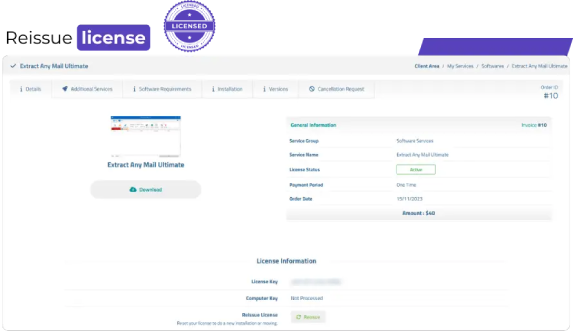
Instantly reissue your license online
Others Product

Check Out Other Products as Addition to Extract Any Mail Ultimate

Email sorter box

Email Sorter Ultimate

Sort emails by their MX
$50 $40
Buy Licenses
Check icon
7-Day Money Back Guarantee
Valid email verifier box

Valid Email Verifier

Verify large email list
$60 $50
Buy Licenses
Check icon
7-Day Money Back Guarantee
Rapid email sender box

Rapid Email Sender

Send emails without any hessle
$50 $40
Buy Licenses
Check icon
7-Day Money Back Guarantee
Email sorter box
Testimonial

What Our Clients Say

Efficient Mail and File Extraction...

Show more
Kara G.
Customer
UK

One of the most important features...

Show more
Nile
Customer
United Kingdom

Fast and Relaible.

Show more
Michael Mick
Customer
Netherlands

I have been having error message...

Show more
Office Morgana
Customer
Latvia

Useful Email Extraction Tool with...

Show more
Linda P.
Managing Director
Canada

Versatile Email Extraction Tool.

Show more
Kara Gariepy
Administrator
Canada
FAQ

Frequently Asked Questions

What is a Gmail email extractor and how does it work?

Gmail email extractor is a desktop software that connects to your Gmail account and extracts all email addresses from your inbox, sent folder, spam or any custom label. Extract Any Mail Ultimate securely logs you in with OAuth 2.0 - no password is stored - and extracts every unique email address to a CSV, Excel or TXT file in minutes.

How do I extract email addresses from Gmail without getting my account banned?

The best way is to use a Gmail email extractor that uses OAuth 2.0 authentication. Google permanently disabled “Less Secure App” access in 2024, so any tool that still asks for your Gmail password will either flag it as a security issue or lock your account. Extract Any Mail Ultimate uses the same login method as Gmail itself, OAuth 2.0, so your account is never flagged.

Can I extract email addresses from Outlook and Office 365 without using a password?

Yes. Extract Any Mail Ultimate supports OAuth 2.0 for both Outlook and Microsoft 365, which means you log in through your browser using Microsoft's own secure login page — no password is ever stored in the software. You only need to register a free app in Azure Portal once to get your Client ID, then the tool handles everything automatically.

Can I buy the license with BTC?

Yes, you can purchase the license key with BTC. Simply select the Bitcoin option on the payment portal and follow the instructions given on the screen.

What is the difference between extracting emails from Gmail versus Outlook?

Gmail extraction uses Google Cloud Console app registration with Google OAuth 2.0. Outlook and Office 365 extraction uses Microsoft OAuth 2.0 through Azure Portal app registration. Both are one time setups . The extraction process – selecting the folders, selecting the output format and running the job, is the same in Extract Any Mail Ultimate for both providers.

Why does my Outlook email extractor keep failing or showing an authentication error?

The most common cause is if you’re using an old tool that uses basic authentication, which Microsoft permanently retired in 2023 for Exchange Online and Microsoft 365. You’ll also need an email extractor that supports modern OAuth 2.0 authentication with an Azure registered app Client ID. Extract Any Mail Ultimate v1.3.2 fixes it completely – setup guide for Azure app registration on the ASTGD blog.

How do I extract emails from a specific Gmail label or folder only?

With Extract Any Mail Ultimate, after logging in with OAuth 2.0, you can choose exactly which Gmail folder/label to scan - Inbox, Sent, Important, Promotions or any custom label you created. You don’t have to extract the whole mailbox, saving time and giving you cleaner, more relevant contact lists.

Is it safe to use an email extractor with my Office 365 business account?

Yes, as long as the tool uses OAuth 2.0 authentication — which is the same security standard Microsoft itself mandates for all third-party Office 365 integrations. Extract Any Mail Ultimate never stores your Microsoft credentials, never uploads your data to any server, and processes everything locally on your Windows PC. Your IT administrator can verify the Azure app permissions before authorising.

Can I extract emails from multiple Gmail or Outlook accounts at the same time?

Yes. Extract Any Mail Ultimate supports batch account extraction — you can import a list of accounts via CSV or TXT file and run the extraction job across all of them simultaneously. The multi-threaded engine can process large jobs without lagging or crashing, and the Smart Pause and Resume feature guarantees that no progress is lost if the job is interrupted.

What output formats does the Gmail and Outlook email extractor export to?

Extract Any Mail Ultimate exports extracted email addresses to three formats: Excel (XLSX), CSV, and plain TXT. You can open the output directly in Excel for list cleaning, import it into any CRM, or upload it to your email marketing platform. No conversion step needed — the export is clean and deduplicated.

Why should I use a desktop email extractor instead of a web-based Gmail or Outlook extraction tool?

Web-based extraction tools upload your Gmail or Outlook login credentials to their own servers, which violates Google and Microsoft's security terms and puts your account at real ban risk. A desktop extractor like Extract Any Mail Ultimate runs entirely on your own Windows PC — your credentials never leave your device, there is no monthly subscription, and you own your extracted contact list permanently with a one-time $40 lifetime license.

WhatsApp
ASTGD Support
Typically replies in a few hours
Hi there! 👋
How can we help you today?